A guest shows up on a Saturday night for dinner. Google says you're open. The door is locked, because you closed early that night and somebody else had already changed your posted hours.
Or it runs the other way. You're open, Maps says otherwise, and the dining room sits empty because nobody who checked their phone walked in. A Google Business Profile is not your own page. It is a record Google keeps about your restaurant, and anyone who opens it can suggest a change.
This page is not about collecting more reviews, other pages already do that well. It's about what actually breaks on a restaurant's profile, how to get it back, and what a card on the table has to survive.
Anyone can suggest new hours, not just you
You are not the only source of change. Google describes two separate paths into your listing, and the second one is not something you do yourself.
Your own correction goes through a check first. Google says so directly:
"Before we publish changes to your profile, we'll check"
Edit your Business Profile, Google Business Profile Help, read September 14, 2026
The other path is a suggested edit. Anyone who lands on your profile and notices a stale value can propose a fix, and Google updates the listing on the strength of that report, not yours. Even your own fix is not instant:
"It usually takes up to 3 days to review your edits, though it can sometimes take longer."
Understand what happens to your Business Profile edits, Google Business Profile Help, read September 14, 2026
Hours move more at a restaurant than almost anywhere else: patio season, a holiday closure, a shortened Sunday. A guest who hits a stale hour usually fixes it themselves rather than telling you. Do not re-save your hours the moment they look wrong for a minute after you edit them. A bad value does not announce itself. You learn about it from a guest standing at a locked door when Google says you're open, or an empty room on a night you actually are.
Marked permanently closed after a break
The single most damaging change lands exactly when it's most likely to happen. Close for a week of staff vacation or the holidays, and a temporary closure can flip to a permanently closed flag in the record.
In Maps the name shows struck through. Nobody hunting for dinner picks a crossed-out restaurant, even a full and open one. The fix takes minutes once you catch it, no appeal and no waiting period, covered step by step on the permanently closed page.
Reviews are not part of this. Google's stated policy for both a temporary and a permanent closure is that the reviews on the profile stay in place either way. Years of ratings survive a struck-through name.
What we need from you, and what we don't
Your restaurant's name and a link to its Google listing. Nothing else.
We don't connect to your reservation system or your point of sale, and we never import a guest list. The card sits by the register or at the host stand, a guest picks it up if they want to, and the screen behind it learns nothing about who they are until they choose what to do. It has nowhere to pull a name, an email, or what they ordered.
A restaurant turns over dozens of names and checks a night, so this matters more here than almost anywhere. There is no guest list, no reservation link, and there never has to be one.
Where the card goes: host stand or the register
At the register, it just has to stand there and be visible. A guest already has their phone out to pay, so it costs them nothing extra. At the table it is different: it sits within reach of plates and glasses, gets wiped down after every party, and has to survive that without degrading or becoming unreadable.
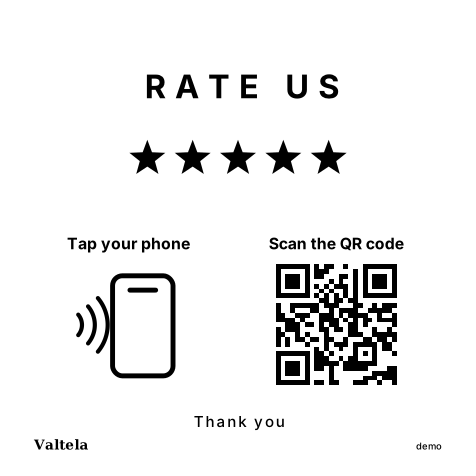
The way a guest reaches for it differs by spot, too. At a table, the phone is already in hand, usually held while waiting on the check, so a scanned QR code is the natural move. Standing at the register, tapping is just as natural. The card carries both, QR and NFC side by side, and works whichever a guest picks.
What holds up at the register does not always hold up between the plates, and the reverse is also true.
The rules for asking, and what it costs
No discount for a review, not on a drink and not on the next check. No pushing a guest to write one at the table while they're still waiting for the bill, and no telling them what it has to say. Asking plainly is fine, and the card is built exactly for that: it offers nothing in exchange, and the guest carries the decision away with them. The full rule set is on the review policy page.
We do not promise a spot in Maps or a better ranking, and neither can anyone else:
"Third parties can't promise or directly influence your business ranking."
Tips for working with third parties to manage your Business Profile, Google Business Profile Help, read September 14, 2026
We never write, order, or remove reviews, never have access to your Google account, and never talk to Google on your behalf. We watch what's publicly visible about your restaurant and tell you the same day it changes.
A yearly license runs $599, and an extra card is $79 a year. The full breakdown is on pricing.
Next step
The complete rules on asking for a Google review, with sources and read dates, are on the review policy page.
Who can actually edit your listing, and how you find out the same day it happens, is on the changed listing page.
And what the card does after a guest picks it up, screen to private message, is on the card page.
Sources
Every citation on this page comes from one of these pages. The link goes to the original source, not to our summary of it.
- Edit your Business Profile - Google Business Profile Help
- Understand what happens to your Business Profile edits - Google Business Profile Help
- Prohibited & restricted content - Maps User Generated Content Policy Help
- Tips for working with third parties to manage your Business Profile - Google Business Profile Help